About Paintation: Famous Art Filters
Turn your photos into stunning masterpieces with the most comprehensive AI art studio on the App Store. Featuring over 500 styles from every major art movement, Paintation allows you to stylize, edit, and retouch your...
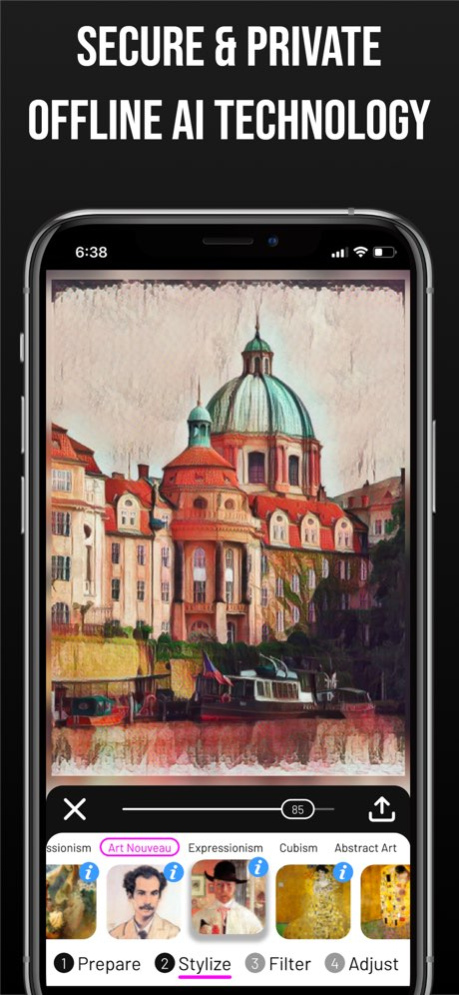
Turn your photos into stunning masterpieces with the most comprehensive AI art studio on the App Store. Featuring over 500 styles from every major art movement, Paintation allows you to stylize, edit, and retouch your images with professional precision-all while keeping your data 100% private. WHY CHOOSE PAINTATION? Unlike other AI editors, Paintation works entirely offline. Using advanced on-device AI models (TFLite), your photos never leave your phone. Experience lightning-fast style transfer without cloud uploads or privacy risks. EXPLORE THE HISTORY OF ART Dive into a massive library of 500+ styles categorized by era: . Renaissance, Baroque, Rococo, and Neoclassicism. . Romanticism, Realism, and Impressionism. . Post-Impressionism, Art Nouveau, and Expressionism. . Cubism, Abstract Art, and Surrealism. . Specialized textures and sketch effects (Charcoal, Pencil, Ink). EDUCATIONAL INTEGRATION Learn as you create! Every style includes an info button linked to WikiArt. Discover the story behind the masterpiece and the artist who inspired your edit. PROFESSIONAL 4-STAGE WORKFLOW 1. PREPARE: Complete retouching suite before you stylize. . Vanish Tool: Effortlessly remove unwanted objects using AI. . Liquify: Reshape and distort for perfect proportions. . Clone Stamp: Duplicate or repair parts of your image. . Background: Automatic detection and replacement. . Standard Tools: Crop, rotate, brightness, contrast, and sharpen. 2. STYLIZE: Apply high-end style transfers. . Choose from 500+ curated styles or create your own by uploading any reference image to use as a custom style. 3. FILTER: Add the finishing touch. . Apply abstract and color filters including Sepia, Black & White, Threshold, Negative, and specialized OpenCV colormaps. 4. ADJUST: Fine-tune the result. . Precision controls for saturation, hue, smoothness, and vignette to make your artwork pop. SAVE & SHARE YOUR WAY Export your creations in multiple formats: . High-resolution result image. . Split-view (Original vs. Result). . Art Collage (Original + Style + Result). KEY FEATURES: . 100% Offline processing - No internet required. . Multi-stage editing: Use your result as a new input. . Selection Category: Quick access to the best-performing styles. . Built-in Vignette and Smoothness tools. Download Paintation today and start your journey through the history of fine art! CREDITS are listed on http://paintation.com Terms of Use: http://paintation.com/terms-of-use-ios.html
Version History Minor improvements and bug fixes 11.2 Aug 9 Minor improvements and bug fixes 11.1 Apr 22 We’ve added a Demo Mode to instantly test effects with pre-loaded images, along with a new Quick Start Guide to help you master the tools and features. 11.0 Jan 27 Minor improvements and bug fixes 10.1 Jan 8 One-time purchase option for premium version. 10.0 Jan 5 Minor improvements and bug fixes 9.6 12/23/2025 Minor improvements and bug fixes 9.5 11/26/2025 Minor improvements and bug fixes 9.4 11/02/2025 Minor improvements and bug fixes 9.3 10/27/2025 Enjoy an ad-free experience in the free version, plus some minor improvements and bug fixes. 9.2 08/20/2025 Minor improvements and bug fixes 9.1 07/11/2025 Added the ability to mark styles as favorites for easier access. 9.0 04/24/2025 Minor improvements and bug fixes 8.5 03/30/2025 Minor improvements and bug fixes 8.4 02/26/2025 Minor improvements and bug fixes 8.3 10/10/2024 Minor improvements and bug fixes 8.2 08/21/2024 Minor improvements and bug fixes 8.1 04/23/2024 The Vanish tool in the Prepare stage now uses AI-powered object removal for seamless background filling, making edits quicker and easier. Try it out! 8.0 02/22/2024 Minor improvements and bug fixes 7.1 12/16/2023 - Enhanced Editing: Seamlessly crop and resize images without resetting stickers and other user-defined masks. - Performance Boost: We've optimized our processing engine for faster image transformations, ensuring a smoother creative flow. 7.0 12/11/2023 Minor improvements and bug fixes 6.5 09/09/2023 Optional magnifier view added to help with mask editing and deform tools. 6.4 05/09/2023 Minor improvements and bug fixes. 6.3 02/26/2023 Minor improvements and bug fixes. 6.2 12/01/2022 Minor improvements and bug fixes. 6.1 11/01/2022
Previous Versions
Here you can find the changelog of Paintation: Famous Art Filters since it was posted on our website on 2021-12-24 13:15:52.
The latest version is 11.2 and it was updated on 2026-10-07 01:07:59. See below the changes in each version.
Paintation: Famous Art Filters version 11.2
Updated At: 2026-10-07
Changes: Version History Minor improvements and bug fixes 11.2 Aug 9 Minor improvements and bug fixes 11.1 Apr 22 We’ve added a Demo Mode to instantly test effects with pre-loaded images, along with a new Quick Start Guide to help you master the tools and features. 11.0 Jan 27 Minor improvements and bug fixes 10.1 Jan 8 One-time purchase option for premium version. 10.0 Jan 5 Minor improvements and bug fixes 9.6 12/23/2025 Minor improvements and bug fixes 9.5 11/26/2025 Minor improvements and bug fixes 9.4 11/02/2025 Minor improvements and bug fixes 9.3 10/27/2025 Enjoy an ad-free experience in the free version, plus some minor improvements and bug fixes. 9.2 08/20/2025 Minor improvements and bug fixes 9.1 07/11/2025 Added the ability to mark styles as favorites for easier access. 9.0 04/24/2025 Minor improvements and bug fixes 8.5 03/30/2025 Minor improvements and bug fixes 8.4 02/26/2025 Minor improvements and bug fixes 8.3 10/10/2024 Minor improvements and bug fixes 8.2 08/21/2024 Minor improvements and bug fixes 8.1 04/23/2024 The Vanish tool in the Prepare stage now uses AI-powered object removal for seamless background filling, making edits quicker and easier. Try it out! 8.0 02/22/2024 Minor improvements and bug fixes 7.1 12/16/2023 - Enhanced Editing: Seamlessly crop and resize images without resetting stickers and other user-defined masks.
- Performance Boost: We've optimized our processing engine for faster image transformations, ensuring a smoother creative flow. 7.0 12/11/2023 Minor improvements and bug fixes 6.5 09/09/2023 Optional magnifier view added to help with mask editing and deform tools. 6.4 05/09/2023 Minor improvements and bug fixes. 6.3 02/26/2023 Minor improvements and bug fixes. 6.2 12/01/2022 Minor improvements and bug fixes. 6.1 11/01/2022
Paintation: Famous Art Filters version 11.2
Updated At: 2026-08-11
Changes: Version History Minor improvements and bug fixes 11.2 1d ago Minor improvements and bug fixes 11.1 Apr 22 We’ve added a Demo Mode to instantly test effects with pre-loaded images, along with a new Quick Start Guide to help you master the tools and features. 11.0 Jan 27 Minor improvements and bug fixes 10.1 Jan 8 One-time purchase option for premium version. 10.0 Jan 5 Minor improvements and bug fixes 9.6 12/23/2025 Minor improvements and bug fixes 9.5 11/26/2025 Minor improvements and bug fixes 9.4 11/02/2025 Minor improvements and bug fixes 9.3 10/27/2025 Enjoy an ad-free experience in the free version, plus some minor improvements and bug fixes. 9.2 08/20/2025 Minor improvements and bug fixes 9.1 07/11/2025 Added the ability to mark styles as favorites for easier access. 9.0 04/24/2025 Minor improvements and bug fixes 8.5 03/30/2025 Minor improvements and bug fixes 8.4 02/26/2025 Minor improvements and bug fixes 8.3 10/10/2024 Minor improvements and bug fixes 8.2 08/21/2024 Minor improvements and bug fixes 8.1 04/23/2024 The Vanish tool in the Prepare stage now uses AI-powered object removal for seamless background filling, making edits quicker and easier. Try it out! 8.0 02/22/2024 Minor improvements and bug fixes 7.1 12/16/2023 - Enhanced Editing: Seamlessly crop and resize images without resetting stickers and other user-defined masks.
- Performance Boost: We've optimized our processing engine for faster image transformations, ensuring a smoother creative flow. 7.0 12/11/2023 Minor improvements and bug fixes 6.5 09/09/2023 Optional magnifier view added to help with mask editing and deform tools. 6.4 05/09/2023 Minor improvements and bug fixes. 6.3 02/26/2023 Minor improvements and bug fixes. 6.2 12/01/2022 Minor improvements and bug fixes. 6.1 11/01/2022
Paintation: Famous Art Filters version 11.1
Updated At: 2026-07-23
Changes: Version History Minor improvements and bug fixes 11.1 Apr 22 We’ve added a Demo Mode to instantly test effects with pre-loaded images, along with a new Quick Start Guide to help you master the tools and features. 11.0 Jan 27 Minor improvements and bug fixes 10.1 Jan 8 One-time purchase option for premium version. 10.0 Jan 5 Minor improvements and bug fixes 9.6 12/23/2025 Minor improvements and bug fixes 9.5 11/26/2025 Minor improvements and bug fixes 9.4 11/02/2025 Minor improvements and bug fixes 9.3 10/27/2025 Enjoy an ad-free experience in the free version, plus some minor improvements and bug fixes. 9.2 08/20/2025 Minor improvements and bug fixes 9.1 07/11/2025 Added the ability to mark styles as favorites for easier access. 9.0 04/24/2025 Minor improvements and bug fixes 8.5 03/30/2025 Minor improvements and bug fixes 8.4 02/26/2025 Minor improvements and bug fixes 8.3 10/10/2024 Minor improvements and bug fixes 8.2 08/21/2024 Minor improvements and bug fixes 8.1 04/23/2024 The Vanish tool in the Prepare stage now uses AI-powered object removal for seamless background filling, making edits quicker and easier. Try it out! 8.0 02/22/2024 Minor improvements and bug fixes 7.1 12/16/2023 - Enhanced Editing: Seamlessly crop and resize images without resetting stickers and other user-defined masks.
- Performance Boost: We've optimized our processing engine for faster image transformations, ensuring a smoother creative flow. 7.0 12/11/2023 Minor improvements and bug fixes 6.5 09/09/2023 Optional magnifier view added to help with mask editing and deform tools. 6.4 05/09/2023 Minor improvements and bug fixes. 6.3 02/26/2023 Minor improvements and bug fixes. 6.2 12/01/2022 Minor improvements and bug fixes. 6.1 11/01/2022 This is a major release that introduces several significant improvements:
- Enhanced editing capabilities with new UI that enables arbitrary zooming, panning, and rotating images with two fingers. You can also use double click to zoom in and out. Rotation is available only in the Prepare and Adjust stages.
- Enhanced mask drawing capabilities with undo and redo. 6.0 10/11/2022
Paintation: Famous Art Filters version 11.0
Updated At: 2026-01-27
Changes: We’ve added a Demo Mode to instantly test effects with pre-loaded images, along with a new Quick Start Guide to help you master the tools and features.
Paintation: Famous Art Filters version 9.2
Updated At: 2025-08-20
Changes: Aug 20, 2025
Version 9.2
Enjoy an ad-free experience in the free version, plus some minor improvements and bug fixes.
Paintation: Famous Art Filters version 9.1
Updated At: 2025-07-11
Changes: Jul 11, 2025
Version 9.1
Minor improvements and bug fixes
Paintation: Famous Art Filters version 9.0
Updated At: 2025-04-24
Changes: Apr 24, 2025
Version 9.0
Added the ability to mark styles as favorites for easier access.
Paintation: Famous Art Filters version 8.5
Updated At: 2025-03-30
Changes: Mar 30, 2025
Version 8.5
Minor improvements and bug fixes
Paintation: Famous Art Filters version 8.4
Updated At: 2025-02-26
Changes: Feb 26, 2025
Version 8.4
Minor improvements and bug fixes
Paintation: Famous Art Filters version 8.3
Updated At: 2024-10-10
Changes: Oct 10, 2024
Version 8.3
Minor improvements and bug fixes
Disclaimer
Official App Store Link
We do not host Paintation: Famous Art Filters on our servers. We did not scan it for viruses, adware, spyware or other type of malware. This app is hosted by Apple and passed their terms and conditions to be listed there. We recommend caution when installing it.
The App Store link for Paintation: Famous Art Filters is provided to you by apps112.com without any warranties, representations or guarantees of any kind, so access it at your own risk.
If you have questions regarding this particular app contact the publisher directly. For questions about the functionalities of apps112.com contact us.